

UniApp + SpringBoot 实现接入支付宝支付功能和退款功能
创始人
2025-05-28 21:14:49
0次
一、支付宝开放平台设置
注册支付宝支付功能需要个体工商户或企业才可以!需要有营业执照才能去申请哦!
1、登录到控制台
进入支付宝开放平台 控制台

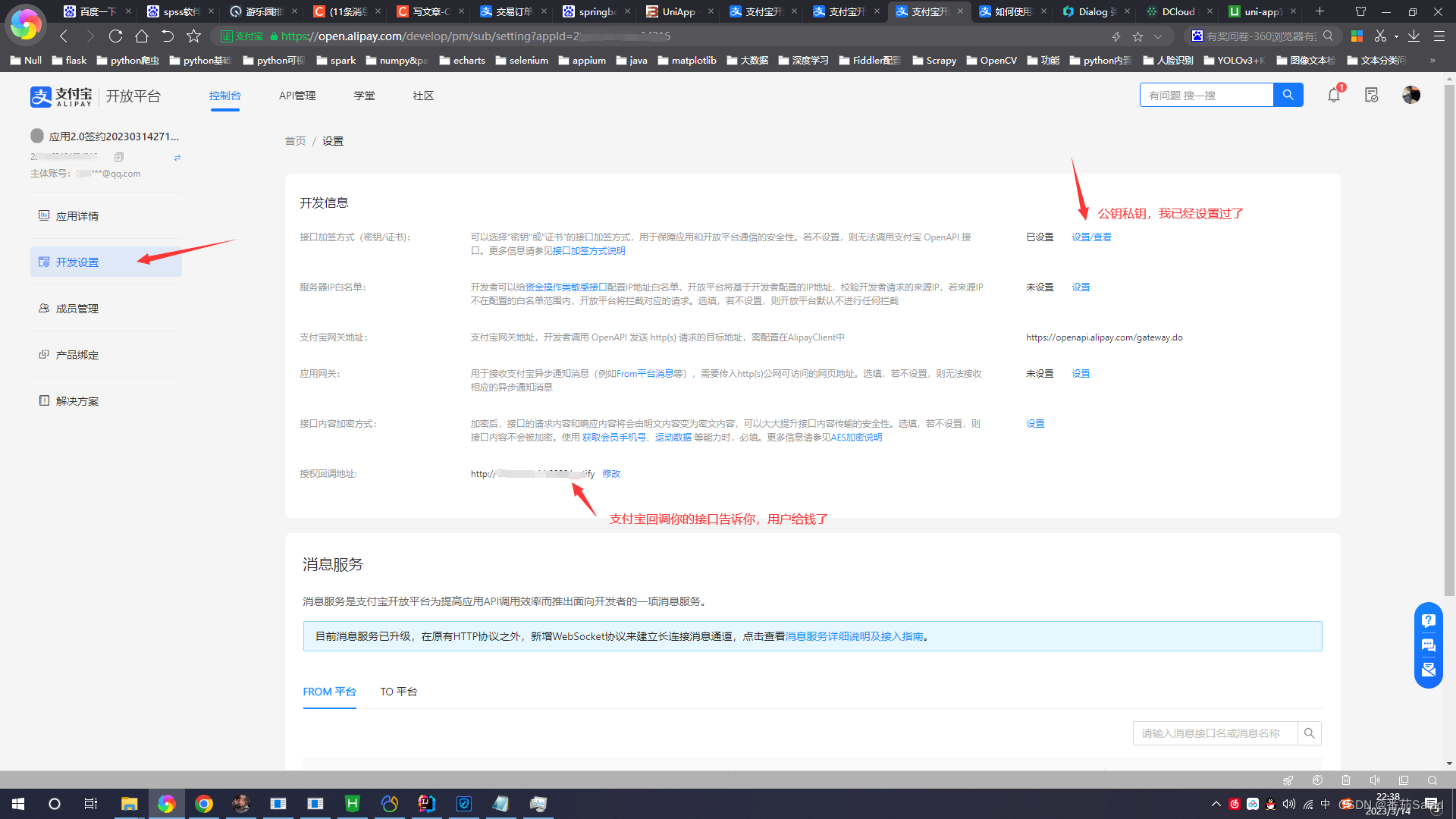
2、开发设置
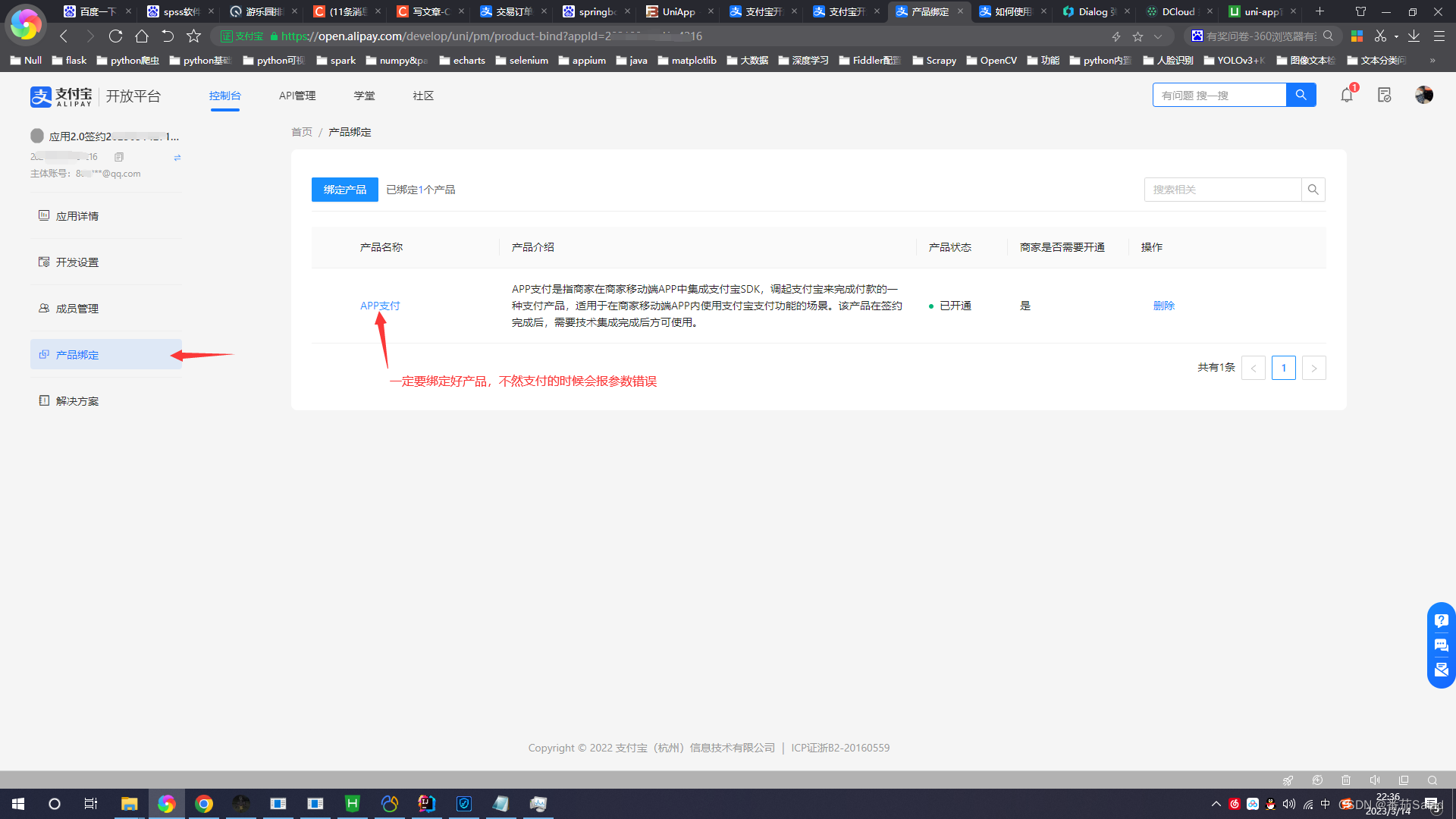
3、产品绑定APP支付
如果没有绑定APP支付就会报商家订单参数异常,请重新发起支付的错误
二、Springboot后端代码
1、pom.xml中导入两个包

com.alipay.sdk alipay-sdk-java 4.22.32.ALL
org.springframework.boot spring-boot-configuration-processor true
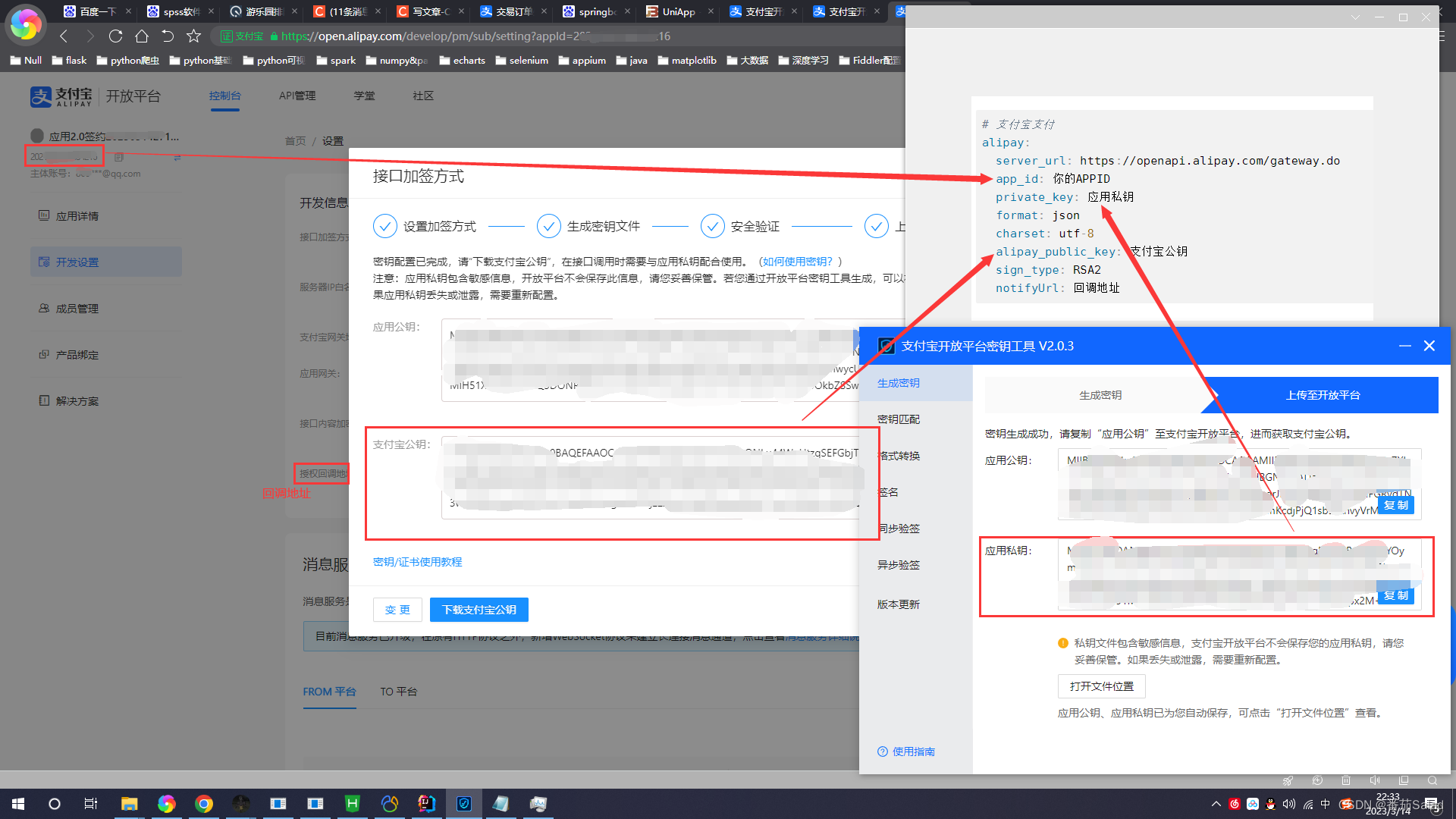
2、application.yml中添加以下配置

# 支付宝支付
alipay:server_url: https://openapi.alipay.com/gateway.doapp_id: 你的APPIDprivate_key: 应用私钥format: jsoncharset: utf-8alipay_public_key: 支付宝公钥sign_type: RSA2notifyUrl: 回调地址
3、新建AlipayConfig类和BizAlipayService类
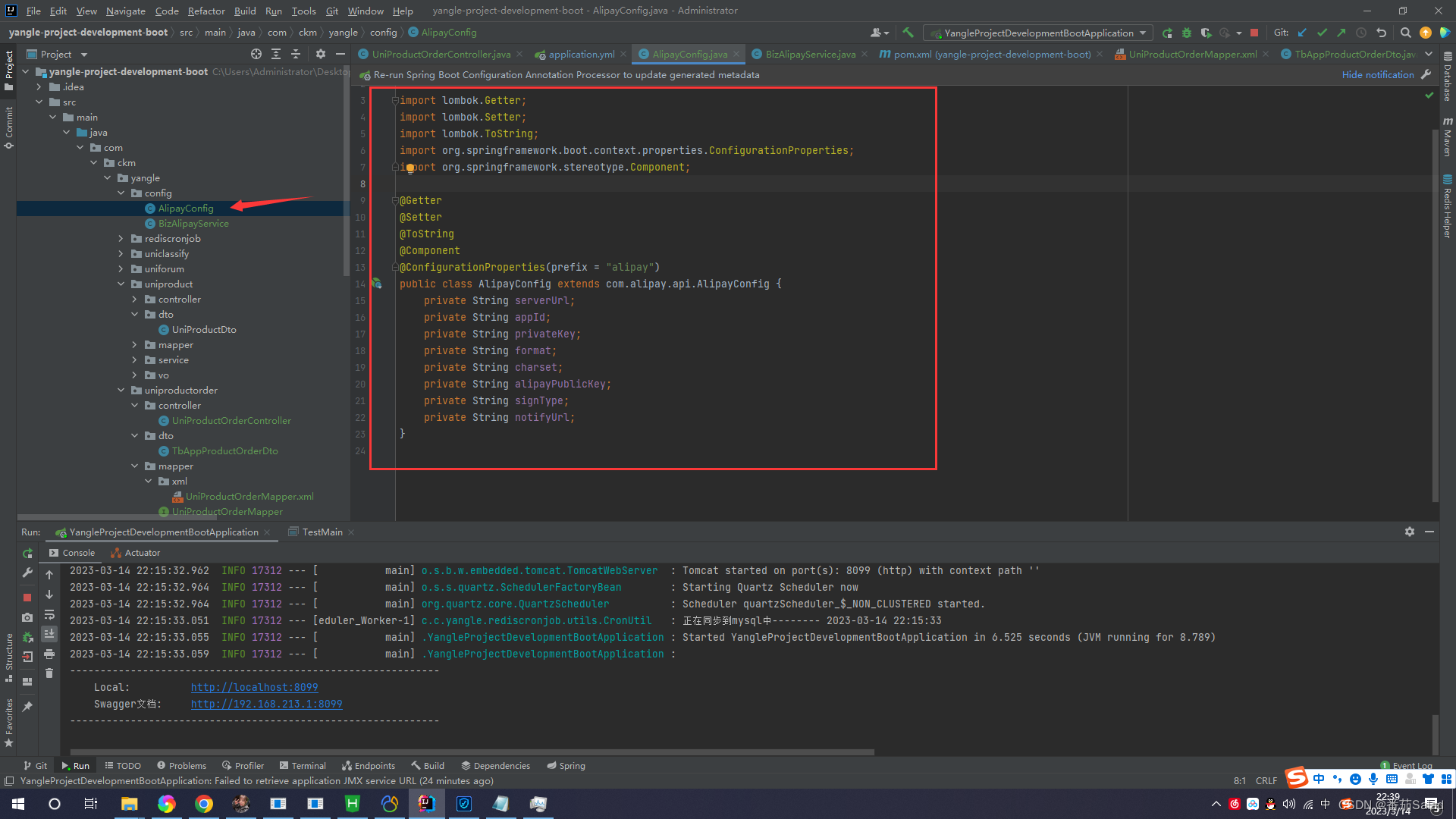
AlipayConfig类代码
import lombok.Getter;
import lombok.Setter;
import lombok.ToString;
import org.springframework.boot.context.properties.ConfigurationProperties;
import org.springframework.stereotype.Component;@Getter
@Setter
@ToString
@Component
@ConfigurationProperties(prefix = "alipay")
public class AlipayConfig extends com.alipay.api.AlipayConfig {private String serverUrl;private String appId;private String privateKey;private String format;private String charset;private String alipayPublicKey;private String signType;private String notifyUrl;
}
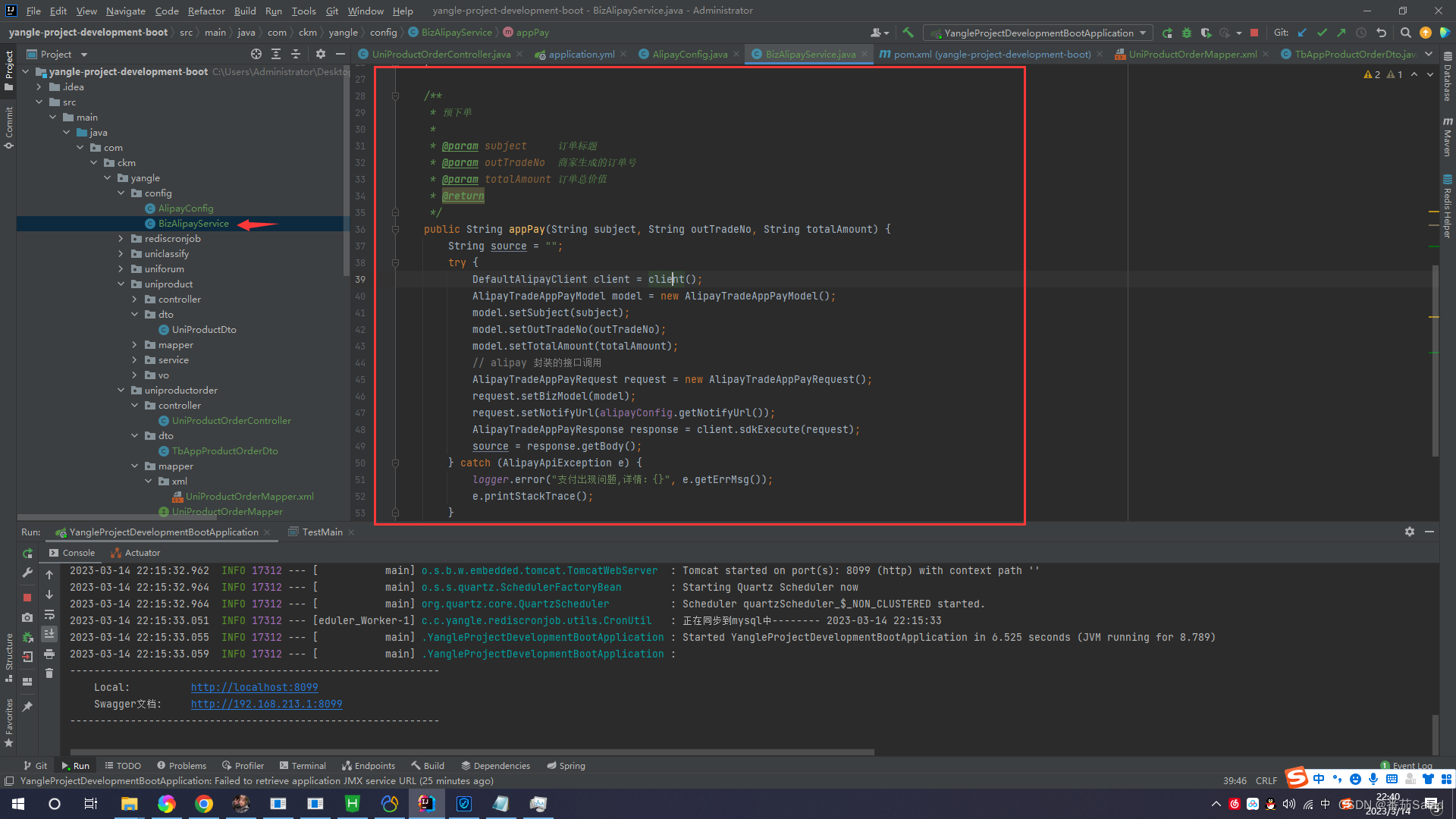
BizAlipayService类代码
import com.alipay.api.AlipayApiException;
import com.alipay.api.DefaultAlipayClient;
import com.alipay.api.domain.AlipayTradeAppPayModel;
import com.alipay.api.request.AlipayTradeAppPayRequest;
import com.alipay.api.response.AlipayTradeAppPayResponse;
import org.slf4j.Logger;
import org.slf4j.LoggerFactory;
import org.springframework.beans.factory.annotation.Autowired;
import org.springframework.stereotype.Service;/*** 阿里云支付类*/
@Service
public class BizAlipayService {private static Logger logger = LoggerFactory.getLogger(BizAlipayService.class);@AutowiredAlipayConfig alipayConfig;private DefaultAlipayClient client() throws AlipayApiException {return new DefaultAlipayClient(alipayConfig);}/*** 预下单** @param subject     订单标题* @param outTradeNo  商家生成的订单号* @param totalAmount 订单总价值* @return*/public String appPay(String subject, String outTradeNo, String totalAmount) {String source = "";try {DefaultAlipayClient client = client();AlipayTradeAppPayModel model = new AlipayTradeAppPayModel();model.setSubject(subject);model.setOutTradeNo(outTradeNo);model.setTotalAmount(totalAmount);// alipay 封装的接口调用AlipayTradeAppPayRequest request = new AlipayTradeAppPayRequest();request.setBizModel(model);request.setNotifyUrl(alipayConfig.getNotifyUrl());AlipayTradeAppPayResponse response = client.sdkExecute(request);source = response.getBody();} catch (AlipayApiException e) {logger.error("支付出现问题,详情:{}", e.getErrMsg());e.printStackTrace();}return source;}
}
4、编写接口支付接口和回调接口

接口代码
@RestController
@CrossOrigin    // @CrossOrigin注解 解决uniapp跨域访问后端问题。
@RequestMapping("/productOrder")
public class UniProductOrderController {@Autowiredprivate AlipayConfig alipayConfig;@Autowiredprivate BizAlipayService alipayService;/*** 发起支付** @return*/@GetMapping("/pay")public Object pay() {System.out.println("正在测试支付宝支付···");String s = alipayService.appPay("测试支付", String.valueOf(System.currentTimeMillis()), new BigDecimal("0.01").toString());System.out.println(s);return s;}/*** 订单回调** @return*/@RequestMapping(method = RequestMethod.POST, value = "/notify")public String orderNotify(HttpServletRequest request) {Map params = new HashMap<>();Map requestParams = request.getParameterMap();for (String name : requestParams.keySet()) {String[] values = requestParams.get(name);String valueStr = "";for (int i = 0; i < values.length; i++) {valueStr = (i == values.length - 1) ? valueStr + values[i] : valueStr + values[i] + ",";}params.put(name, valueStr);}try {boolean flag = AlipaySignature.rsaCheckV1(params, alipayConfig.getAlipayPublicKey(), alipayConfig.getCharset(), alipayConfig.getSignType());if (flag) {System.out.println("支付回调信息:"+ params);return "success";} else {return "error";}} catch (AlipayApiException e) {System.out.println("支付宝错误回调:"+e.getErrMsg());e.printStackTrace();return "error";}}
}
三、UniApp前端代码
1、配置manifest.json的App模块开启支付

2、编写uni.request请求

代码
//发起支付
pay(){let that = thisuni.request({url: getApp().globalData.myurl + "/productOrder/pay",data:{},method: 'GET',dataType: 'json',header: {'content-type': 'application/x-www-form-urlencoded'},success(res) {console.log(res);uni.requestPayment({provider: 'alipay',orderInfo: res.data,success(r) {uni.showToast({title:"支付成功",icon: "success"})},fail(e) {uni.showToast({title:"用户取消支付",icon: "error"})},complete: () => {console.log("payment结束")}})}})
},
四、支付功能展示
1、用户确认支付
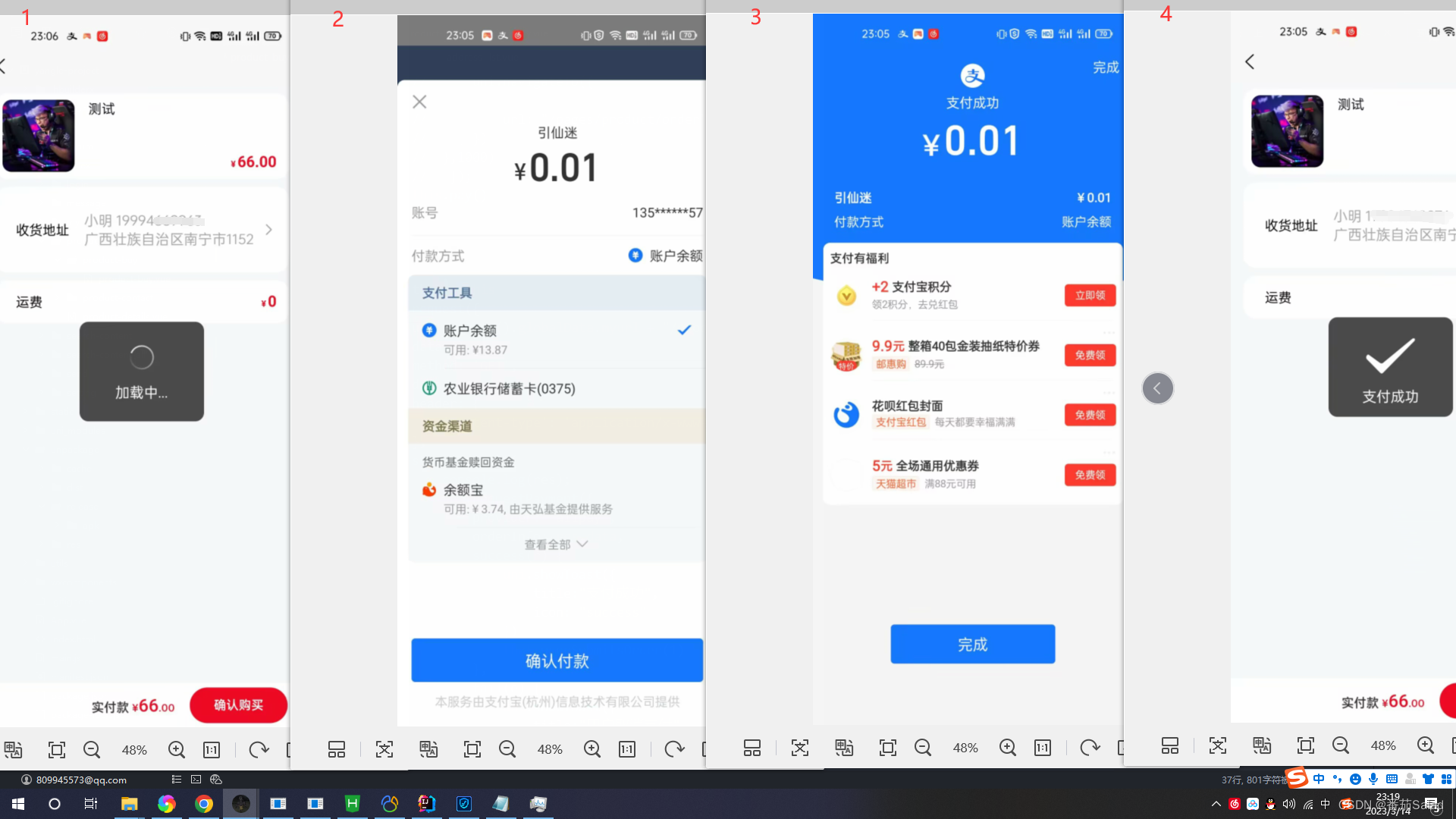
2、用户取消支付

五、退款功能
1、支付成功回调返回结果

返回结果:

返回结果里面的trade_no 一会退款需要用到这个!
2、在刚才的BizAlipayService.类中添加以下代码
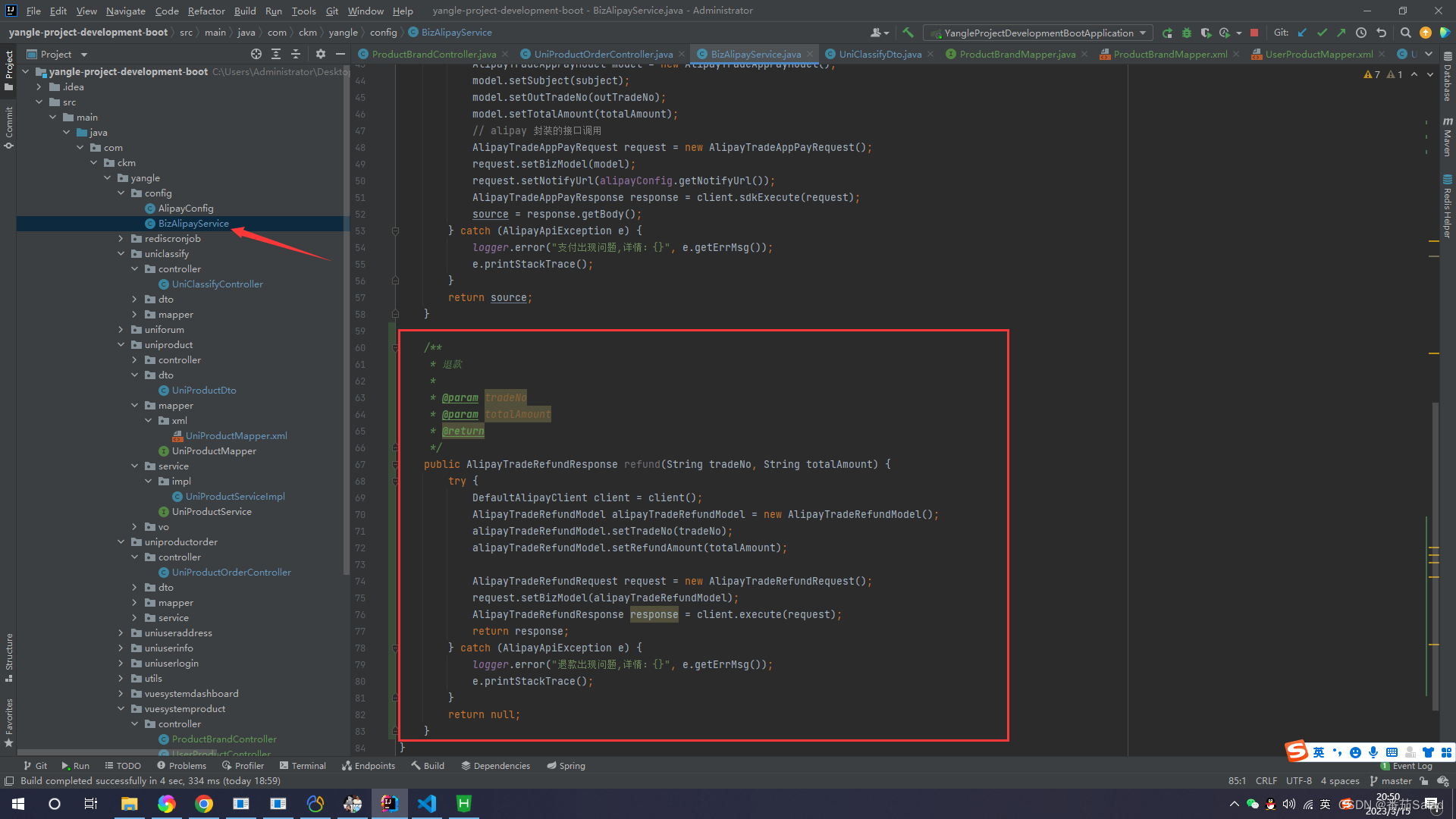
代码
/*** 退款** @param tradeNo* @param totalAmount* @return*/
public AlipayTradeRefundResponse refund(String tradeNo, String totalAmount) {try {DefaultAlipayClient client = client();AlipayTradeRefundModel alipayTradeRefundModel = new AlipayTradeRefundModel();alipayTradeRefundModel.setTradeNo(tradeNo);alipayTradeRefundModel.setRefundAmount(totalAmount);AlipayTradeRefundRequest request = new AlipayTradeRefundRequest();request.setBizModel(alipayTradeRefundModel);AlipayTradeRefundResponse response = client.execute(request);return response;} catch (AlipayApiException e) {logger.error("退款出现问题,详情:{}", e.getErrMsg());e.printStackTrace();}return null;
}
3、在接口中添加退款接口
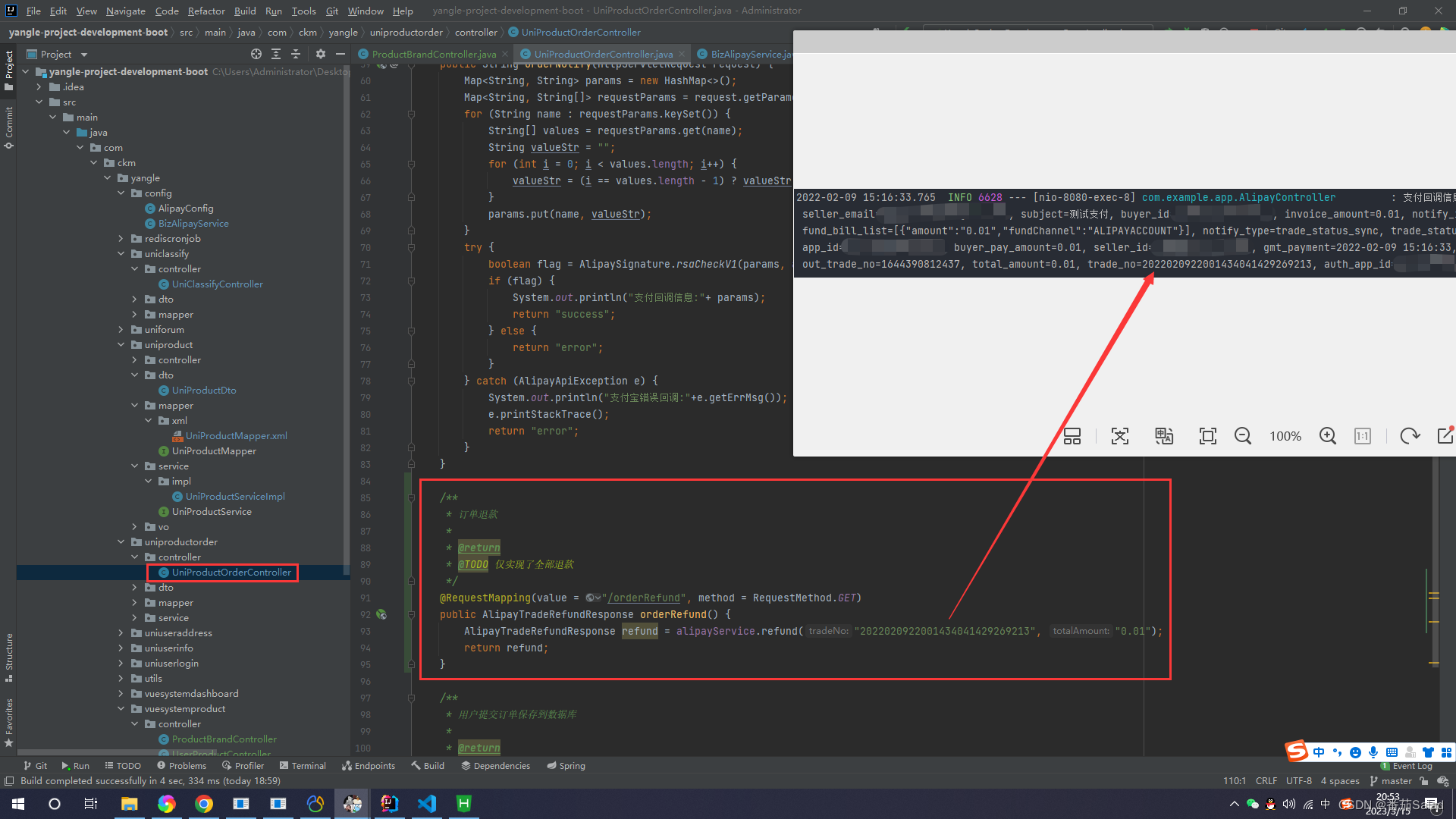
代码
/*** 订单退款** @return* @TODO 仅实现了全部退款*/
@RequestMapping(value = "/orderRefund", method = RequestMethod.GET)
public AlipayTradeRefundResponse orderRefund() {AlipayTradeRefundResponse refund = alipayService.refund("2022020922001434041429269213", "0.01");return refund;
}
本文仅供学习使用,本文参考博客园作者奔跑的砖头的文章感谢作者的详细说明以及代码 (*╯3╰) (*╯3╰) (*╯3╰)
相关内容
热门资讯
吹风机养生:真能顶得上老中医吗...
近年来,社交平台上流行起了“吹风机养生”的说法,许多博主宣称用吹风机对着特定的穴位吹热风,可以温阳驱...
深夜王炸,GPT-5.5发布
财联社 美东时间周四,OpenAI公布了其最新的人工智能模型——GPT-5.5。该公司表示,该模型在...
台湾同胞参加海军成立77周年纪...
4月23日,台湾同胞登上海军舰艇参观并与海军军官合影留念。新华社记者 李杰 摄 新华社青岛4月23日...
特朗普:这世界疯了
美国司法部当地时间4月23日证实,参与强行控制并转移委内瑞拉总统马杜罗的美国陆军特种部队军士长甘农·...
从冲击千亿市值到被申请破产重整...
图/ic 八年亏损超84亿元!“中国影视第一股”华谊兄弟被申请重整。 4月23日晚,华谊兄弟传媒股份...
“保安与停车女子和好接吻”,A...
撰稿/苏士仪(媒体人) 编辑/王言虎 校对/王心 ▲女司机与保安发生肢体冲突一事,持续引发关注。图...
美伊冲突前景不明 国际油价再度...
当地时间4月24日,由于美国与伊朗冲突前景仍不明朗,市场避险情绪升温,国际油价再度上涨。布伦特原油上...
美国发生群体性枪击事件,8名1...
新华社消息,美国路易斯安那州什里夫波特市19日发生一起群体性枪击事件,造成8名儿童死亡,枪手被警方击...
274亿美金砸向核武器,威慑还...
文︱陆弃 能源部长克里斯·赖特在2026年4月16号的一场公开场合称,美国正在推进的核武器现代化计划...