

csdn博客转markdown
创始人
2025-05-30 06:48:23
0次
近期完成了csdn上的部分博客转到个人博客上,csdn使用的传统编辑器,个人博客使用的markdown,所以下面分享一下两者之间转化。
1. 安装nodejs和npm,这两步网上教程很多,可以参考下网上
2.安装clean-mark
npm install clean-mark --global
该工具可以将我们的博客做一个初步的转markdown,用法如下
clean-mark "https://blog.csdn.net/yyy/article/details/xxx"
双引号内部为某篇具体需要转换的博文链接,转换成功后在当前目录下会出现xxx.md
3.对md文件做进一步的修正
使用clean-mark工具转换的md目前有两个问题
- 图片,使用的图片链接会是csdn服务器上的图片,并带有水印,需要将去除水印的图片下载到本地,并将md文件中的链接替换为本地图片链接
- 乱码,在一些未识别编程语言的代码片中,中文会出现乱码,形如变,这是XML字符实体的一种表示形式,&#x表示十六进制
由于需要修正的md文件很多,一个个处理很不方便,所以将需要转换的博客通过第二步转换后同一在一个目录,然后编写程序,只要扫描到该目录下的md文件,就进行修正
import java.io.*;
import java.net.HttpURLConnection;
import java.net.URL;
import java.nio.file.Files;
import java.nio.file.Paths;
import java.util.List;
import java.util.regex.Matcher;
import java.util.regex.Pattern;public class CsdnHandle {private final String fileRoot = "H:\\CSDN"; //需修正的md文件夹路径private final String artImgFilePath = "file://D:/Program Files/Gridea/post-images/"; //md文件中本地图片根路径public static void main(String[] args) {CsdnHandle handle = new CsdnHandle();handle.process();}public void process() {String imgRoot = fileRoot+"\\img\\"; //下载的去水印图片String tomd = fileRoot+"\\tomd\\"; //转化完的md文件File file = new File(imgRoot);if (!file.exists()) {file.mkdirs();}file = new File(tomd);if (!file.exists()) {file.mkdirs();}file = new File(fileRoot);File[] fileArray = file.listFiles();for (File file1 : fileArray) {if (!file1.isDirectory()) {//判断文件是否是md文件Integer hz = file1.getAbsolutePath().indexOf(".md");if (hz != -1) {conversionMd(file1,imgRoot,tomd);System.out.println(file1.getName() + " ok");}}}}public void conversionMd(File file,String imgRootPath,String toMdPath) {List allLines = null;try {allLines = Files.readAllLines(Paths.get(file.getAbsolutePath()));} catch (IOException e) {e.printStackTrace();}int head = 0;String title = null;Pattern pattern = Pattern.compile("!\\[]\\(.*?\\)");//匹配链接int imgId = 1;OutputStream out = null;BufferedWriter bw = null;for (String line : allLines) {if(line.equals("---")) {head++;continue;}if(head == 1) {if(line.indexOf("title: ") != -1) {title = line.substring("title: ".length());title = title.replace(" ","之");title = title.replace("-","之");File mdfile = new File(toMdPath+title+".md");try {out=new FileOutputStream(mdfile);bw=new BufferedWriter(new OutputStreamWriter(out,"utf-8"));} catch (FileNotFoundException e) {e.printStackTrace();} catch (UnsupportedEncodingException e) {e.printStackTrace();}}}if(head == 2 && title != null && bw != null) {Matcher matcher = pattern.matcher(line);while (matcher.find()) {String httpLink = matcher.group(0).substring(4,matcher.group(0).length()-1);String path = linkSaveImg(imgId, title,imgRootPath,httpLink);line = line.replace(httpLink, path);imgId++;}try {bw.write(unescape(line));bw.newLine();} catch (IOException e) {e.printStackTrace();}}}try {if(bw != null)bw.close();if(out != null)out.close();} catch (IOException e) {e.printStackTrace();}}//下载图片到本地public String linkSaveImg(int imgId, String title,String filePath,String http) {String sp[] = http.split("\\?");String suffix = sp[0].substring(sp[0].lastIndexOf("."));try {URL url = new URL(sp[0]);HttpURLConnection conn = (HttpURLConnection) url.openConnection();// 设置超时间为3秒conn.setConnectTimeout(3 * 1000);// 防止屏蔽程序抓取而返回403错误conn.setRequestProperty("User-Agent", "Mozilla/4.0 (compatible; MSIE 5.0; Windows NT; DigExt)");// 得到输入流InputStream inputStream = conn.getInputStream();// 获取字节数组byte[] getData = readInputStream(inputStream);// 文件保存位置File file = new File(filePath+title+"_"+imgId+suffix);FileOutputStream fos = new FileOutputStream(file);fos.write(getData);if (fos != null) {fos.close();}if (inputStream != null) {inputStream.close();}} catch (Exception e) {e.printStackTrace();}return artImgFilePath+title+"_"+imgId+suffix;}public byte[] readInputStream(InputStream inputStream) throws IOException {byte[] buffer = new byte[1024];int len = 0;ByteArrayOutputStream bos = new ByteArrayOutputStream();while ((len = inputStream.read(buffer)) != -1) {bos.write(buffer, 0, len);}bos.close();return bos.toByteArray();}//解决乱码问题public static String unescape(String src) {int index = -1;while((index=src.indexOf("&#x")) != -1) {String data = src.substring(index+3,index+7);char ch = (char) Integer.parseInt(data, 16);src = src.replace("&#x"+data+";",""+ch);}return src;}}
使用Java编写这个程序的主要原因是网络相关操作真香!
上面分享的是传统编辑器转markdown,如果本身博文就是使用markdown编写,那么有个可全部打包下载的方案
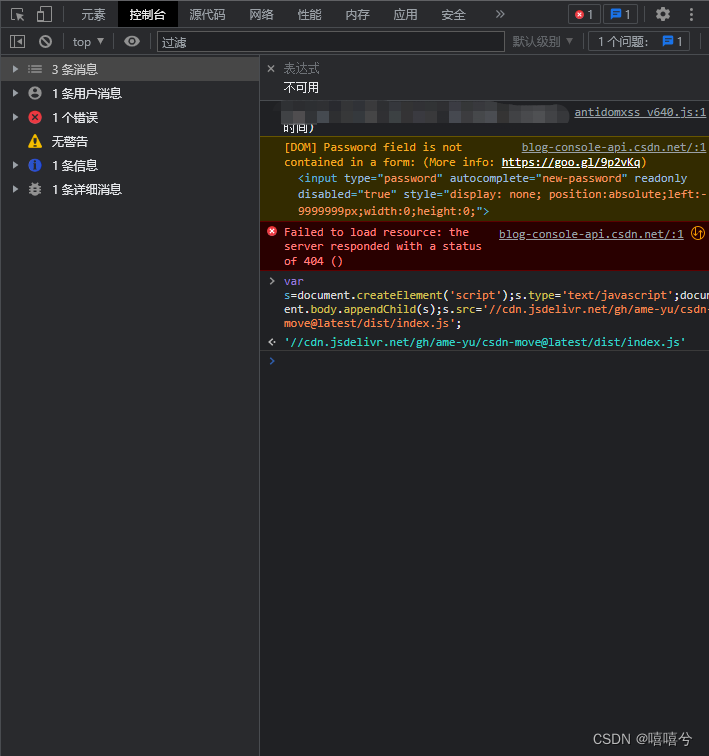
1.登陆CSDN后,点击链接:https://blog-console-api.csdn.net/

链接打开会发现是一个404,没错,不用怀疑是操作错了。
2.F12 -> console
在该404界面F12打开 开发者工具,并选择控制台(console)
输入如下代码回车
var s=document.createElement('script');s.type='text/javascript';document.body.appendChild(s);s.src='//cdn.jsdelivr.net/gh/ame-yu/csdn-move@latest/dist/index.js';
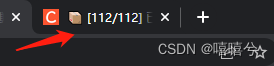
稍等片刻便可打包下载一个zip文件,里面包含所有的md文章,文章数越多,其等待时间越长,可将鼠标放置浏览器标签页查看其打包进度情况。
下一篇:【MyBatis】学生表格操作
相关内容
热门资讯
造假泛滥、虫入车间、产能拉胯:...
订阅 快刀财经 ▲ 做您的私人商学院世界药房的致命短板。作者:朱末来源:快刀财经(ID:kuai...
影石创新股价“脚踝斩”,刘靖康...
出品|达摩财经近日,第三方数据公司IDC发布了2026年一季度全球手持智能相机行业报告。报告数据显示...
美股半导体股,集体上涨 美股半...
6月29日,美股三大指数集体高开,道指涨0.29%,纳指涨0.96%,标普500指数涨0.55%。 ...
三只*ST股,将摘星脱帽 st...
6月29日晚间,A股三家*ST公司公告称将“摘星脱帽”。 具体来看,*ST艾艾发布关于撤销退市风险警...
【就业创业典型】大棚逐梦人:一...
编者按:近年来,延安市残疾人工作坚持以习近平新时代中国特色社会主义思想为指导,以促进残疾人事业全面高...
公募基金锚定新质生产力,多维赋...
6月22日消息,中国证监会主席吴清近日在2026陆家嘴论坛上表示,资本市场与新质生产力双向奔赴、相互...
液冷服务器概念震荡走强,冰轮环...
6月22日消息,午后液冷服务器概念震荡走强,冰轮环境9天5板,此前康盛股份涨停,大元泵业、川润股份、...
涉留神峪煤矿事故,国家矿山安全...
6月22日消息,国家矿山安全监察局山西局监察执法八处三级调研员耿青禄涉嫌严重违法,涉通洲集团留神峪煤...
周立成拟任中国投资协会秘书长
6月22日消息,中国投资协会发布关于中国投资协会第五届理事会届中调整负责人人选的公示:周立成,男,汉...
以防长称以军已做好对伊采取独立...
据央视新闻,以色列国防部长卡茨日前在与军事记者的闭门谈话中,阐述了以色列在黎巴嫩、伊朗及加沙地带等多...