

网络安全实验——pgp的使用
网络安全实验——pgp的使用
实验要求
① 以三到四人为一组,通过使用pgp软件完成密钥的生成,公钥的公布,利用pgp保护数据并传输,验证签名等工作。
② 这里我使用GnuPG
实验原理
PGP
PGP(英语:Pretty Good Privacy,直译:优良保密协议)是一套用于讯息加密、验证的应用程序。
PGP加密由一系列散列、数据压缩、对称密钥加密,以及公钥加密的算法组合而成。每个步骤均支持几种算法,用户可以选择一个使用。每个公钥均绑定一个用户名和/或者E-mail地址。该系统的最初版本通常称为可信网或X.509系统;X.509系统使用的是基于数字证书认证机构的分层方案,该方案后来被加入到PGP的实现中。当前的PGP加密版本通过一个自动密钥管理服务器来进行密钥的可靠存放。
GnuPG
GNU Privacy Guard(GnuPG 或 GPG)是一个密码学软件,用于加密、签名通信内容及管理非对称密码学的密钥。GnuPG 是自由软件,遵循 IETF 订定的 OpenPGP 技术标准设计,并与 PGP 保持兼容。
GnuPG 使用用户自行生成的非对称密钥对来加密信息,由此产生的公钥可以同其他用户以各种方式交换,如密钥服务器。他们必须小心交换密钥,以防止得到伪造的密钥。GnuPG 还可以向信息添加一个数字签名,这样,收件人可以验证信息完整性和发件人。
GnuPG 支持的各种加密算法:
- 对称加密:CAST5、Camellia、Triple DES、AES、Blowfish、Twofish、ChaCha20、IDEA (从 1.4.13 和 2.0.20 开始被添加)
- 非对称加密:ElGamal、RSA、DSA、ECDSA、EdDSA
- 密码散列函数:RIPEMD-160、MD5、SHA-1、SHA-2、Tiger
- 数字签名:DSA、RSA、ECDSA、EdDSA
实验步骤
安装GnuPG
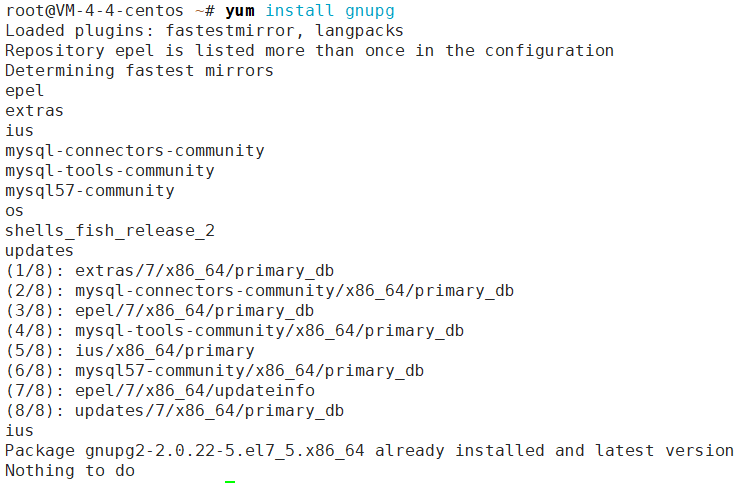
生成密钥
创建密钥
root@VM-4-4-centos ~# gpg --gen-key
gpg (GnuPG) 2.0.22; Copyright (C) 2013 Free Software Foundation, Inc.
This is free software: you are free to change and redistribute it.
There is NO WARRANTY, to the extent permitted by law.
选择密钥类型
Please select what kind of key you want:(1) RSA and RSA (default)(2) DSA and Elgamal(3) DSA (sign only)(4) RSA (sign only)
Your selection? 1
选择密钥有效时长
这里我选择无限期
Please specify how long the key should be valid.0 = key does not expire  = key expires in n daysw = key expires in n weeksm = key expires in n monthsy = key expires in n years
Key is valid for? (0) 0
Key does not expire at all
Is this correct? (y/N) y
填写个人信息
GnuPG needs to construct a user ID to identify your key.Real name: Yi Junquan
Email address: 2696974822@qq.com
Comment: software
You selected this USER-ID:"Yi Junquan (software) <2696974822@qq.com>"Change (N)ame, (C)omment, (E)mail or (O)kay/(Q)uit? O
设置密码
You need a Passphrase to protect your secret key.
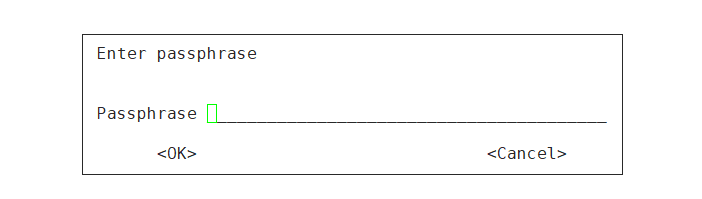
生成密钥
We need to generate a lot of random bytes. It is a good idea to perform
some other action (type on the keyboard, move the mouse, utilize the
disks) during the prime generation; this gives the random number
generator a better chance to gain enough entropy.
jsiasohfaosaojdoajdojajjajjjahhahsoasduoduaoudjldajldasjkdaskdiouoeiajksajWe need to generate a lot of random bytes. It is a good idea to perform
some other action (type on the keyboard, move the mouse, utilize the
disks) during the prime generation; this gives the random number
generator a better chance to gain enough entropy.
gpg: /root/.gnupg/trustdb.gpg: trustdb created
gpg: key 20424507 marked as ultimately trusted
public and secret key created and signed.gpg: checking the trustdb
gpg: 3 marginal(s) needed, 1 complete(s) needed, PGP trust model
gpg: depth: 0  valid:   1  signed:   0  trust: 0-, 0q, 0n, 0m, 0f, 1u
pub   2048R/20424507 2022-06-07Key fingerprint = FC27 85F2 925C 096B 10A2  0CA9 F843 5EE8 2042 4507
uid                  Yi Junquan (software) <2696974822@qq.com>
sub   2048R/AA8CDF2E 2022-06-07
上面的字符串"20424507",这是"用户ID"的Hash字符串,可以用来替代"用户ID"。
管理密钥
列出密钥
list-keys参数列出系统中已有的密钥
root@VM-4-4-centos ~#  gpg --list-keys
/root/.gnupg/pubring.gpg
------------------------
pub   2048R/20424507 2022-06-07
uid                  Yi Junquan (software) <2696974822@qq.com>
sub   2048R/AA8CDF2E 2022-06-07
第一行显示公钥文件名(pubring.gpg),第二行显示公钥特征(2048位,Hash字符串和生成时间),第三行显示"用户ID",第四行显示私钥特征。
输出密钥
公钥文件(.gnupg/pubring.gpg)以二进制形式储存,armor参数可以将其转换为ASCII码显示。
gpg --armor --output public-key.txt --export 20424507
"用户ID"指定哪个用户的公钥,output参数指定输出文件名(public-key.txt)。
类似地,export-secret-keys参数可以转换私钥。
上传公钥
公钥服务器是网络上专门储存用户公钥的服务器。send-keys参数可以将公钥上传到服务器。
root@VM-4-4-centos ~# gpg  --keyserver hkp://keyserver.ubuntu.com:80 --send-keys 20424507
gpg: sending key 20424507 to hkp server keyserver.ubuntu.com
在服务器上搜索公钥是否上传成功:
root@VM-4-4-centos ~# gpg --keyserver hkp://keyserver.ubuntu.com:80 --search-keys 2696974822@qq.com
gpg: searching for "2696974822@qq.com" from hkp server keyserver.ubuntu.com
(1)	Yi Junquan (software) <2696974822@qq.com>2048 bit RSA key 20424507, created: 2022-06-07
Keys 1-1 of 1 for "2696974822@qq.com".  Enter number(s), N)ext, or Q)uit > q
可见上传公钥成功
获取他人公钥
这里我获取的是x同学的公钥(我与他以及y同学合作完成该实验)。
root@VM-4-4-centos ~# gpg --keyserver hkp://keyserver.ubuntu.com:80 --search-keys Corona09@163.com
gpg: searching for "Corona09@163.com" from hkp server keyserver.ubuntu.com
(1)	Corona X 2048 bit RSA key C282680C, created: 2022-06-07
Keys 1-1 of 1 for "Corona09@163.com".  Enter number(s), N)ext, or Q)uit > 1
gpg: requesting key C282680C from hkp server keyserver.ubuntu.com
gpg: key C282680C: public key "Corona X " imported
gpg: Total number processed: 1
gpg:               imported: 1  (RSA: 1)
加密和解密
加密
encrypt参数用于加密。gpg --recipient [用户ID] --output demo.en.txt --encrypt demo.txt
recipient参数指定接收者的公钥,output参数指定加密后的文件名,encrypt参数指定源文件。运行上面的命令后,demo.en.txt就是已加密的文件,可以把它发给对方。
root@VM-4-4-centos /tmp# gpg --recipient C282680C --output yjqencrypt.txt --encrypt yjqtest.txt
gpg: 160789BF: There is no assurance this key belongs to the named userpub  2048R/160789BF 2022-06-07 Corona X Primary key fingerprint: DC1B 2EBA D490 E664 F333  C433 77A6 5B9B C282 680CSubkey fingerprint: 6F25 A88F 9602 D8EE BE3E  5425 59E7 8A88 1607 89BFIt is NOT certain that the key belongs to the person named
in the user ID.  If you *really* know what you are doing,
you may answer the next question with yes.Use this key anyway? (y/N) y
源文件和加密后的文件内容如下:
root@VM-4-4-centos /tmp# cat yjqtest.txt
美哉吾校,真理之花,青年之模楷,邦国之荣华,
校旗飘扬,与日俱长,为世界之光,为世界之光。
美哉吾校,鼓舞群伦,启发我睿智,激励我热忱,
英俊济跄,经营四方,为世界之光,为世界之光。
美哉吾校,性灵泉源,科学之奥府,艺术之林园,
实业扩张,进步无疆,为世界之光,为世界之光。
美哉吾校,灿烂文明,实学培国本,民族得中兴,
宇土茫茫,山高水长,为世界之光,为世界之光。
root@VM-4-4-centos /tmp# cat yjqencrypt.txt 斃Ԍ6g¼IYu:㪒٭F]B0@·>ª8Ң#2PBIgK%膗69ʷЛ
ܤᡊ⬸dW¯8m²蘚eVL̷҃°G16ךtx£½뿾{pi:ÿ¸ؘܴ¦.ݨ¡k2¿¥þ݀˞©¡« ¹${r9%PΘPW¹ԨP݉ɮþ#뮲Ϻ¨&ۚ¹Ē1
]nj룏ÿ"P*4Պz· GwթºǮG¸ܗ¨Dj犻ާ亨©Ѧ͊ªz/-$J}h½'D´mоۖz0Ԫ2ÿ*%«ÿS{WحDΐ`w¬ɠ=?Ŕʗª𐕳
ĮTӇZ§:¹½Pʃ6¡§窖J܃bi`©bO9"1ѯ+T¿{¹¹¢(7¸m8Y"± ¹֜ӓdnי¸87Swֶl¢l㐷^JȥL'¸ЇqŦʽeMeҷ)V㳪ගѪ¸D(TI(⣓^¶°
¹´`¢$«0G8S?|5« ѨہVv⏎
解密
由x同学解密后得到
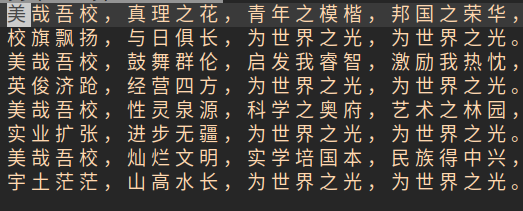
同时我使用gpg --decrypt mod.en.txt 解密x同学发来的文件。
root@VM-4-4-centos /tmp# gpg --decrypt mod.en.txt You need a passphrase to unlock the secret key for
user: "Yi Junquan (software) <2696974822@qq.com>"
2048-bit RSA key, ID AA8CDF2E, created 2022-06-07 (main key ID 20424507)gpg: encrypted with 2048-bit RSA key, ID AA8CDF2E, created 2022-06-07"Yi Junquan (software) <2696974822@qq.com>"
泉佬我榜, 西交希望; 软院代表, 世界之光.(ps 看个玩笑就好
__   __  _  ___    _____ ___  _
\ \ / / | |/ _ \  |_   _/ _ \| |    \ V /  | | | | |   | || | | | |    | | |_| | |_| |   | || |_| | |___ |_|\___/ \__\_\   |_| \__\_\_____|
签名
签名
root@VM-4-4-centos /tmp# vim yjqsigntest.txt
root@VM-4-4-centos /tmp# gpg --sign yjqsigntest.txt You need a passphrase to unlock the secret key for
user: "Yi Junquan (software) <2696974822@qq.com>"
2048-bit RSA key, ID 20424507, created 2022-06-07
验证签名
由x同学验证签名得到:

签名+加密
gpg --local-user [发信者ID] --recipient [接收者ID] --armor --sign --encrypt demo.txt
local-user参数指定用发信者的私钥签名,recipient参数指定用接收者的公钥加密,armor参数表示采用ASCII码形式显示,sign参数表示需要签名,encrypt参数表示指定源文件。
root@VM-4-4-centos /tmp#  gpg --local-user 20424507  --recipient  C282680C --armor --sign --encrypt yjqsignencrypt.txtYou need a passphrase to unlock the secret key for
user: "Yi Junquan (software) <2696974822@qq.com>"
2048-bit RSA key, ID 20424507, created 2022-06-07gpg: 160789BF: There is no assurance this key belongs to the named userpub  2048R/160789BF 2022-06-07 Corona X Primary key fingerprint: DC1B 2EBA D490 E664 F333  C433 77A6 5B9B C282 680CSubkey fingerprint: 6F25 A88F 9602 D8EE BE3E  5425 59E7 8A88 1607 89BFIt is NOT certain that the key belongs to the person named
in the user ID.  If you *really* know what you are doing,
you may answer the next question with yes.Use this key anyway? (y/N) y ![[外链图片转存失败,源站可能有防盗链机制,建议将图片保存下来直接上传(img-4cCBV5iz-1679057603911)(https://note-image-1307786938.cos.ap-beijing.myqcloud.com/typora/F42I[N$H%K]X81ND4B5_R{X.gif)]](https://img-blog.csdnimg.cn/e14a5439a0a24f6e893903d4b72171bb.png)
实验结果
成功完成密钥的生成,公钥的公布,利用pgp保护数据并传输,验证签名等工作。