

xxl-job任务调度中心部署整合SpringBoot
创始人
2025-05-28 15:05:15
0次
使用Docker部署调度中心
1、拉取镜像
docker pull xuxueli/xxl-job-admin:2.3.1
2、从gitee下载sql文件
https://gitee.com/xuxueli0323/xxl-job/tree/master/doc/db
 在数据库中运行sql文件

3、运行xxl-job镜像
docker run -e PARAMS="--spring.datasource.url=jdbc:mysql://182.40.202.xxx:3306/xxl_job?useUnicode=true&characterEncoding=UTF-8&autoReconnect=true&serverTimezone=UTC --spring.datasource.username=root --spring.datasource.password=123456" -p 8090:8080 -p 9999:9999 -v /root/sifan/xxl-job:/data/applogs --name=xxl-job-admin -d xuxueli/xxl-job-admin:2.3.1
注意:数据库ip、用户名、密码配置成自己的;需要开放两个端口一个供调度器使用,一个供执行器使用;端口值自己可以定义。我这里使用了8090端口和9999端口。
4、访问控制面板
http://182.40.202.xxx:8090/xxl-job-admin/jobinfo
默认用户名:admin 密码:123456
注意:有设置防火墙和安全组的需要开放端口。

SpringBoot整合xxl-job
pom依赖
com.xuxueli xxl-job-core 2.3.1 yml配置
# 任务调度中心
api:initListen:###开启配置xxl: true
xxl:job:admin:addresses: http://182.40.202.xxx:8090/xxl-job-admin/userName: adminpassword: 123456accessToken: default_tokenexecutor:appname: core### xxl-job executor registry-address: default use address to registry , otherwise use ip:port if address is nulladdress:### xxl-job executor server-infoip:### 执行器端口号 [选填]:小于等于0则自动获取;默认端口为9999,单机部署多个执行器时,注意要配置不同执行器端口;port: 9999### 执行器运行日志文件存储磁盘路径 [选填] :需要对该路径拥有读写权限;为空则使用默认路径logpath: logs/xxl-job/jobhandler### xxl-job executor log-retention-dayslogretentiondays: 7
在yml中配置了一个执行器appname为core
配置类
@Configuration
@ConditionalOnProperty(prefix = "api", name = "initListen.xxl")
@Slf4j
public class XXLJobConfig {@Value("${xxl.job.admin.addresses}")private String adminAddresses;@Value("${xxl.job.accessToken}")private String accessToken;@Value("${xxl.job.executor.appname}")private String appname;@Value("${xxl.job.executor.address}")private String address;@Value("${xxl.job.executor.ip}")private String ip;@Value("${xxl.job.executor.port}")private int port;@Value("${xxl.job.executor.logpath}")private String logPath;@Value("${xxl.job.executor.logretentiondays}")private int logRetentionDays;@Beanpublic XxlJobSpringExecutor xxlJobExecutor() {log.info(">>>>>>>>>>> xxl-job config init.");XxlJobSpringExecutor xxlJobSpringExecutor = new XxlJobSpringExecutor();xxlJobSpringExecutor.setAdminAddresses(adminAddresses);xxlJobSpringExecutor.setAppname(appname);xxlJobSpringExecutor.setAddress(address);xxlJobSpringExecutor.setIp(ip);xxlJobSpringExecutor.setPort(port);xxlJobSpringExecutor.setAccessToken(accessToken);xxlJobSpringExecutor.setLogPath(logPath);xxlJobSpringExecutor.setLogRetentionDays(logRetentionDays);return xxlJobSpringExecutor;}}
SpringBoot连接任务调度中心
上面在yml配置了一个执行器
接下来去调度中心配置,点击新增
 这里appname写yml定义的appname的值。我这里是core

启动SpringBoot,成功注册
 任务调度中心也出现注册的信息

SpringBoot创建定时任务
在SpringBoot中创建一个Job用于测试,处理器的名字为helloWordHandler
@Component
@Slf4j
public class XxlJob {@com.xxl.job.core.handler.annotation.XxlJob("helloWordHandler")public void demoJobHandler() throws Exception {XxlJobHelper.log("XXL-JOB, Hello World.");log.info("XXL-JOB, Hello World.");for (int i = 0; i < 5; i++) {System.out.println("Hello World");XxlJobHelper.log("beat at:" + i);TimeUnit.SECONDS.sleep(1);}}
}
在调度中心创建定时任务
指定创建的执行器
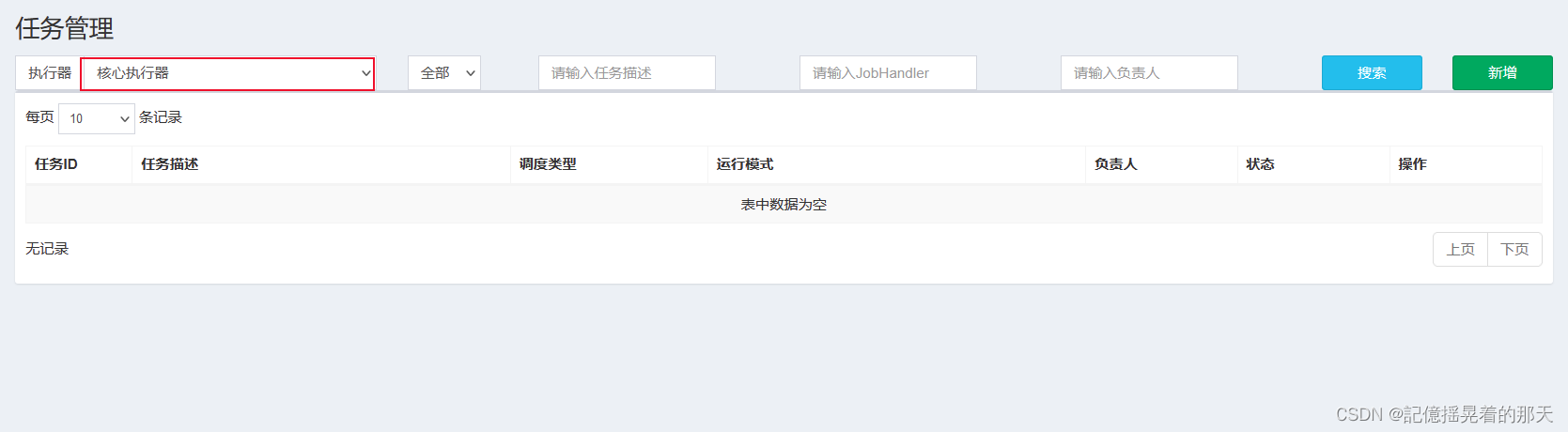
 写上cron和处理器,处理器是自己在代码中@XxlJob注解中的值

启动任务
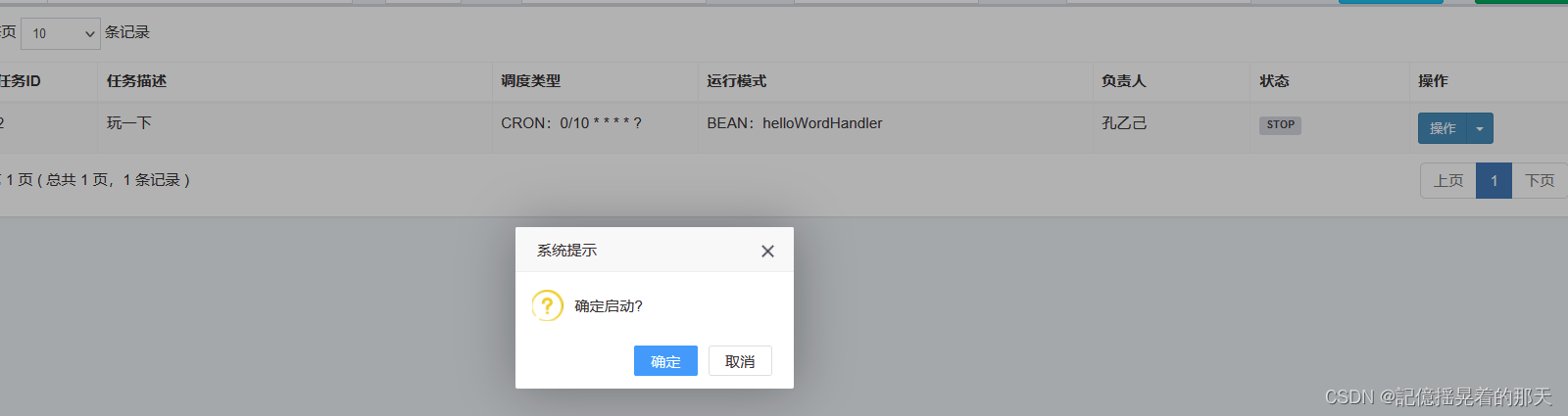
把应用部署之后可以看到定时任务运行了
 调度日志也ok
停掉任务后台也不再打印
相关内容
热门资讯
原创 美...
最近,美国和伊朗同意通过巴基斯坦提出的为期两周的停火协议,试图给这场渐趋紧张的冲突踩下“刹车”。然而...
美股三大指数集体转跌
9月4日消息,美股三大指数集体转跌。截至目前,纳指跌0.13%,道指跌0.06%,标普500指数跌0...
佩斯科夫:俄总统代表正在访美 ...
△俄罗斯总统新闻秘书佩斯科夫(资料图) 当地时间4月10日,俄罗斯总统新闻秘书佩斯科夫在当日简报会上...
面对寒武纪为首的科创50股价大...
9月4日消息,面对寒武纪为首的科创50股价大幅回调,机构观点出现明显分歧:部分谨慎的投资者建议远离过...
国内期货夜盘收盘多数上涨,焦煤...
9月4日消息,国内期货夜盘收盘多数上涨,焦煤涨近2%,橡胶、甲醇、焦炭涨超1%;跌幅方面,低硫燃料油...
太太乐CEO曹辉主动辞职,雀巢...
红星资本据4月10日消息,今日,有市场消息称,雀巢大中华区烹调食品业务负责人兼太太乐首席执行官(CE...
电影《南京照相馆》进入影史票房...
9月4日消息,据网络平台数据,电影《南京照相馆》累计票房突破29.14亿,超《中国机长》票房成绩,进...
阿里筹备出海顶级闭门会:99家...
记者获悉,阿里旗下跨境电商平台速卖通筹备4月15日在深圳举办一场闭门的品牌峰会。仅对头部品牌高管实行...
国际航协:7月全球航空货运总需...
9月4日消息,国际航空运输协会发布7月全球航空货运需求定期数据显示,全球航空货运总需求按照货运吨公里...
跨境支付开启合规新时代,天阳科...
4月10日,中国香港金融管理局于下午五时正式公布首批稳定币牌照。据悉,这是全球范围内首个由主要国际金...